In order to view the disk change monitoring results for a monitoring command, click on the command item in the commands view.
The monitoring command dialog shows the detected disk changes and allows one to categorize and filter detected disk changes,
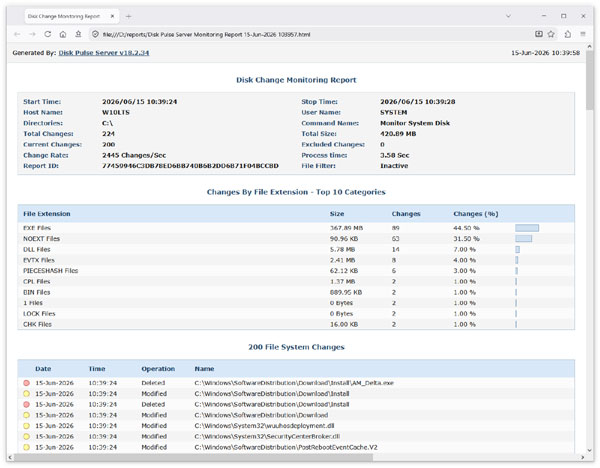
display different types of statistical charts, save disk change monitoring reports to a number of different report formats
including HTML, text, Excel CSV, XML, PDF and export disk change monitoring results to an SQL database.
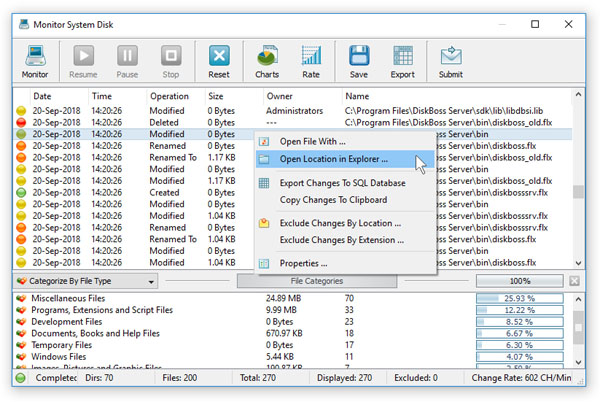
For each detected disk change, the top view shows the change date and time, change type, the size of the changed file,
the owner of newly created or modified files and the full name of the changed file or directory. The bottom view shows
categories of detected changes according to the currently selected file categorization mode. By default,
DiskPulse categorizes changed files by the file extension. In addition, the user is provided with the ability
to categorize and filter changed files by the change type, file type, file owner, file size, file attributes,
top-level directory or user-custom rules.

In order to change the file categorization mode, click on the categories combo box and select an appropriate file categorization mode.
For example, in order to categorize changed files by the file owner, select the 'Categorize By User Name' mode. In addition,
the user is provided with the ability to filter changed files by one or more selected categories. For example,
select a category in the bottom view, press the right mouse button and select the 'Apply Filter' menu item.
DiskPulse will filter changed files and show changes related to the selected category.